Repurposing Podcast Content with AI and n8n
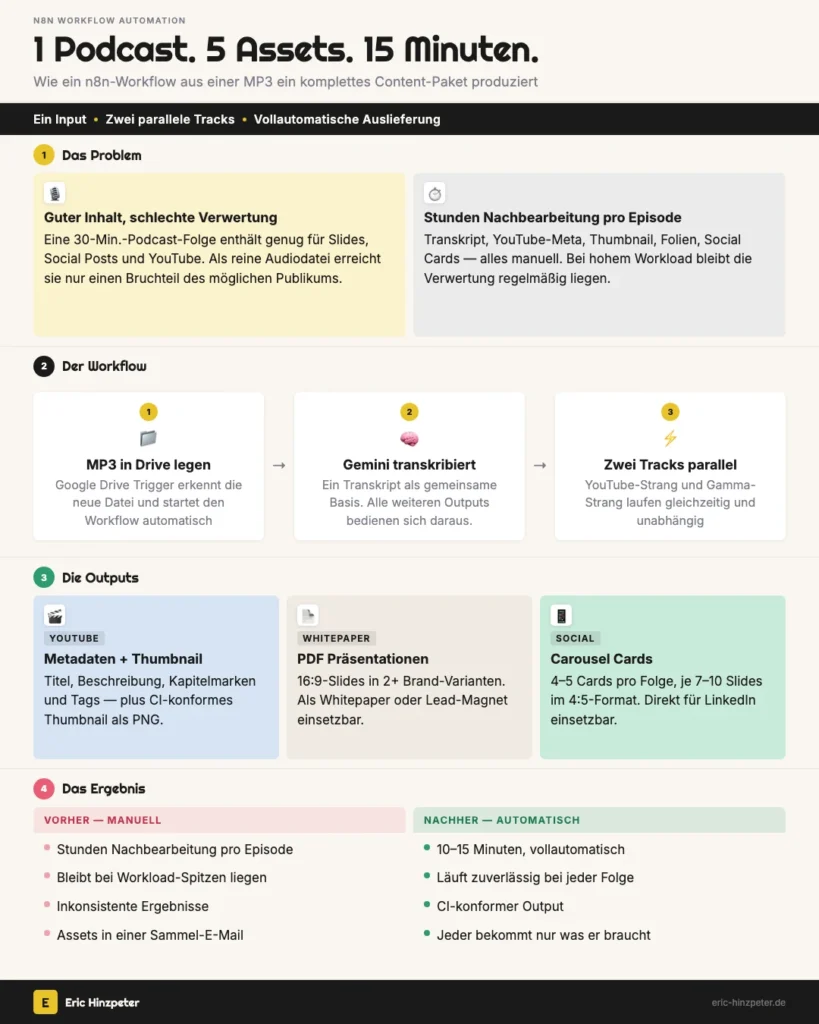
An MP3 lands in a Google Drive folder. Ten to fifteen minutes later, transcript, YouTube metadata, thumbnail, slide decks and social cards are ready.
· 7 min
An MP3 lands in a Google Drive folder, and then there's nothing left to do for a while. Ten to fifteen minutes later, a transcript, a YouTube title and description with chapter markers and a matching thumbnail are ready. On top of that come slide decks as PDF and four to five social carousels, each emailed to the right people. No pitch here: it's a workflow I use in production, and this post shows how it's built.
Why podcast repurposing usually gets left undone
Expert podcasts and interviews are full of useful material. As a plain audio or video file, though, they only reach a fraction of the audience they could. Half an hour of recording easily covers a slide deck, several social posts and a properly tagged YouTube upload.
That repurposing still rarely happens on its own. Someone has to transcribe the recording, write a YouTube title and description and set chapter markers. Then there's a thumbnail, reworked slides, finished social cards and getting it all to the right people.
That's hours of post-production per episode, and it gets skipped for lack of time, not lack of will. In most content teams this work piles up behind other priorities until at some point it stops happening altogether.
One transcript, two parallel production tracks
The workflow starts with a single action: an MP3 lands in a specific Google Drive folder. A Drive trigger spots the new file and kicks off two parallel tracks, one for the YouTube assets, one for content distribution.
The first step is the same on both tracks. Gemini transcribes the audio, and everything after that feeds off this one transcript. So a single input already holds everything that several outputs need. That's exactly why a branching workflow beats one long prompt chain here.
I built it in n8n, the same automation tool behind a few other marketing workflows I've documented. If you're just getting started with n8n itself, that post is an easier way in before you take on something this size.
The YouTube assets: metadata, chapters and a thumbnail
The YouTube track produces three things from the transcript: SEO metadata, chapter markers and a thumbnail. Each runs as its own small pipeline, not as one big prompt. Chapter markers look like a detail at first glance, but they're the part that affects watch time the most. Viewers jump straight to the section they care about instead of dropping the episode because they can't find the relevant moment.
Gemini turns the transcript into structured JSON output with title, description, tags and chapter timestamps. A Code node reads that JSON and builds the finished YouTube description with clickable timestamps. Then the same node bundles the complete upload package for YouTube Studio, so in the end all that's left is the upload.
Why the thumbnail is an art-direction problem, not an image prompt
For the thumbnail, the direct route from transcript to result doesn't work. Instead of asking a model to make a thumbnail, an AI agent takes on the role of art director. It knows the color palette, typography and layout rules and writes the image prompt itself. Its output is JSON again, with the image prompt, the hook text for the thumbnail and a short rationale for the design call.
That prompt then goes via OpenRouter to Gemini, which renders the image. The Base64 result gets converted into a PNG and attached to the email with the YouTube assets.
Image generation ate the most build time, more than any other part of the workflow. Getting consistent, on-brand results took real iteration. Small wording changes in the prompt produced completely different image styles. In the end, what fixed it was a disciplined prompt structure rather than a better model, with the brand rules spelled out instead of just hinted at.
If you want a lighter, manual version of the same idea: my thumbnail generator lets you drag text and images into a template, no prompt work at all.
Content distribution: decks and social cards from one transcript
Parallel to the YouTube track, a second track handles content distribution. It splits again into two paths: full decks from the complete transcript, and social cards from individually extracted topics.
Decks straight from the transcript
The complete transcript goes to the Gamma API as a 16:9 deck and gets exported as PDF. The workflow creates at least two variants with different brand themes and saves each one in the matching brand folder. The finished PDFs work as a whitepaper or lead magnet without further editing, with none of the design round that used to be due after every recording.
What surprised me is how well Gamma handles a raw transcript as input. It pulls the information out cleanly, and the resulting slides hold up on their own, no designer pass needed. If you want to know more about automated slide decks with AI, my post on AI presentations goes further.
Breaking a transcript into topics that stand on their own
The second path was harder to build, but more interesting. Gemini Flash extracts individual topics and key points from the transcript as a JSON array, one entry per topic with its supporting points. The workflow splits that array and creates a Gamma social card in 4:5 format for each topic.
What's hard is the split, more than the extraction itself. Each point has to stand on its own and offer something of value. A social card that only makes sense together with the rest of the episode is useless in a feed. Getting the extraction prompt to reliably deliver topics that also work in isolation took several rounds of rewriting, not just tuning a parameter.
A typical half-hour episode yields four to five social cards with seven to ten slides each, finished carousel material for LinkedIn or Instagram. That lets you spread a single recording over several weeks without anyone having to go back into the transcript.
Why delivery is split by recipient
The workflow sends the results to different people depending on what they contain. The YouTube assets, meaning title, description, tags and thumbnail, go by email to whoever runs the channel. The content distribution deliverables, deck PDFs and social card links, go to a different recipient list with an HTML overview of URLs and download links.
That split was a deliberate decision, not an accident of how the workflow grew over time. From the start I wanted to avoid someone opening an email with five different file types and having to sort out what's even relevant to them.
If you work with YouTube assets, you get only those. If you need decks, you get only those. Every recipient gets exactly what matters for their next step, instead of one big pile they have to sort through themselves.
What the workflow delivers in practice
I built the workflow alone and run it myself. Build time was about three weeks, and it's in production now. The stack: n8n for orchestration, Gemini for transcription and metadata. Add to that the Gamma API for decks and social cards, OpenRouter for image generation and Google Drive as the trigger.
Each run produces a transcript, YouTube metadata with chapter markers, an on-brand PNG thumbnail, deck PDFs in several brand variants and four to five social carousel cards per episode topic, all emailed to the right teams. From dropped file to finished package takes ten to fifteen minutes. That's work that used to cost hours of manual post-production, when it happened at all.
What I'd do differently today: put more time into the input, less into the output. Clearer guidance from the start on who each output is for and which channel it goes out on would have saved a lot of rework later. The more precise the input, the better the result at every stage downstream. Sounds trivial, but it's what cost me the most rework.
On the first build I spent too much time on the output workflow and too little on the quality of the input. I paid for that with extra rounds of iteration on the thumbnail and social card prompts.
Are you building something similar yourself, or do you have questions about the stack? I'm on LinkedIn: eric-hinzpeter-content-marketing.
FAQ
- Can AI turn a podcast into social media content automatically?
- Yes. Without a clean transcript nothing moves, that's the first step everything depends on. Once you have it, an AI model can extract individual topics and key points as structured data and hand each one to a design tool that builds a social card from it. The hard part isn't the AI step itself, it's a prompt that splits the transcript into topics that each stand on their own, instead of fragments that only make sense alongside the rest of the episode.
- How do you automate YouTube metadata from an audio file?
- Transcribe the audio first, then have an AI model turn the transcript into structured output: title, description, tags and chapter timestamps as JSON. The JSON structure matters because it means you no longer have to parse text by hand. A code step downstream reads that JSON and builds the finished YouTube description with clickable chapter markers, ready to paste into YouTube Studio.
- Can AI generate on-brand thumbnails automatically?
- Yes, if you give the model your actual brand rules and not just a text prompt. In this workflow, one AI step plays art director: it knows the color palette, typography and layout rules and writes the image prompt itself, plus hook text for the thumbnail and a short rationale for the design call. A second model renders the actual image from that. Getting consistent results took real iteration, small wording changes in the prompt led to completely different styles.

Eric Hinzpeter
Eric Hinzpeter, Senior B2B Content Strategist. He builds AI agents and marketing automation for production use and writes up what comes out of it here.