NOTE· 2026-07-20· 6 min
How to Turn One Podcast Recording into a Full Content Package with AI
Drop a podcast MP3 into a Google Drive folder and get a transcript, YouTube metadata, a thumbnail, slide decks, and social carousels back in 10-15 minutes.
Can one podcast recording become a full content package with AI?
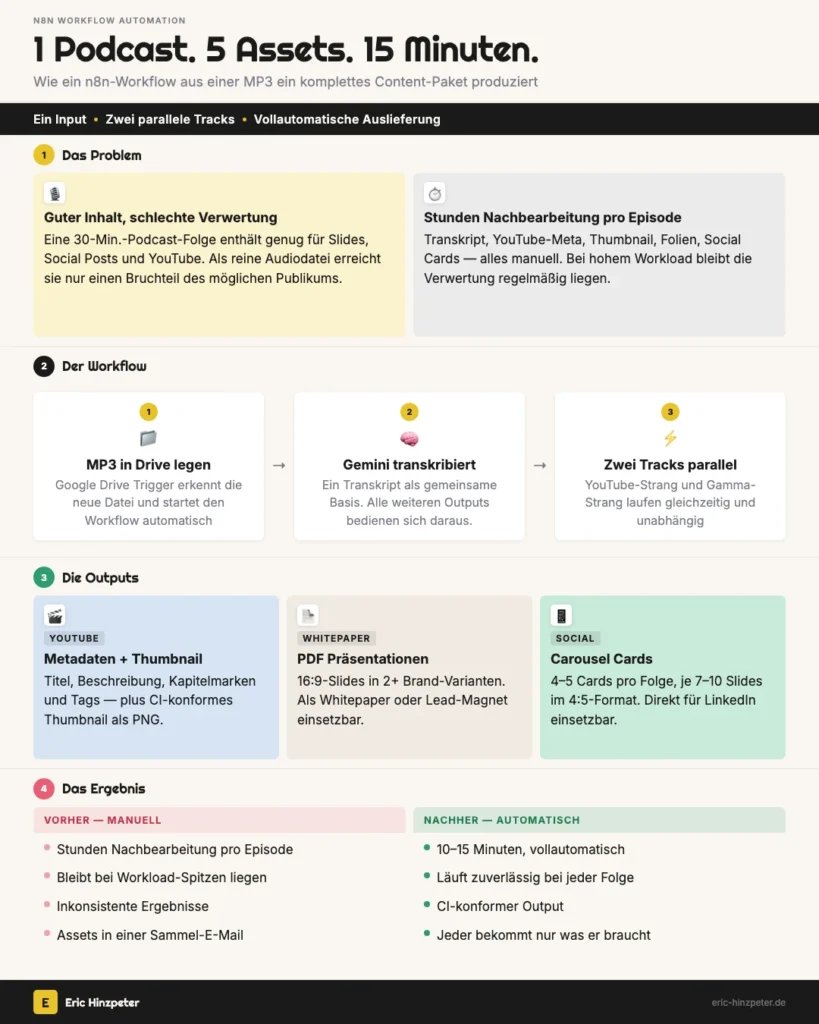
Yes. Drop an MP3 into a Google Drive folder and walk away. Ten to fifteen minutes later you have a transcript, a YouTube title and description with chapter markers, an on-brand thumbnail, slide decks as PDF, and 4-5 social carousel cards, delivered by email to the right people. That's not a pitch, it's a workflow I run in production, and this post walks through how it's built.
Why podcast repurposing usually doesn't happen
Expert podcasts and interviews contain genuinely useful material. As raw audio or video, they reach a fraction of the audience they could. A 30-minute episode holds enough content for a slide deck, several social posts, and a properly tagged YouTube upload.
That repurposing rarely happens on its own. Someone has to transcribe the recording, write a YouTube title and description, set chapter markers, design a thumbnail, restructure the content into slides, build social cards, and get everything to the right people. That's hours of post-production per episode. Not from lack of will. From lack of time. In most content teams, that work just piles up behind other priorities.
If you want the production side of this instead, that is, actually recording a solid podcast episode in the first place, my step-by-step guide to a company podcast covers gear, cadence, and distribution.
The approach: one transcript, two parallel tracks
The workflow fires on a single action: drop an MP3 into a specific Google Drive folder. A Drive trigger picks up the new file and kicks off two parallel production tracks, one for YouTube assets, one for content distribution.
The first step on both tracks is the same: Gemini transcribes the audio. Everything downstream feeds off that one transcript. One input, many outputs, which is the whole point of building it as a branching workflow instead of a single long prompt chain.
I built this in n8n, the same automation tool behind a handful of other marketing workflows I've documented. If you're new to n8n itself, that beginner post is a reasonable place to start before tackling something this size.
The YouTube assets: metadata, chapters, and a thumbnail
The YouTube branch produces three things from the transcript: SEO metadata, chapter markers, and a thumbnail. Each one runs as its own small pipeline, not one big prompt.
Gemini turns the transcript into a structured JSON output with title, description, tags, and chapter timestamps. A code node downstream parses that JSON, assembles the final YouTube description with clickable timestamps, and prepares the upload package for YouTube Studio.
Treating thumbnail generation as an art-direction problem, not an image prompt
The thumbnail is the one part that isn't a straight transcript-to-output step. Instead of asking a model to "make a thumbnail," an AI agent acts as an art director: it knows the corporate identity rules, palette, type, layout constraints, and writes the image prompt itself. Its output is JSON with the image prompt, the hook text for the thumbnail, and a short rationale for the creative call.
That prompt then goes to Gemini via OpenRouter, which renders the image. The base64 result gets converted to PNG and attached to the YouTube assets email.
Image generation ate the most build time of the whole workflow. Getting consistent, on-brand results took real iteration. Small wording changes in the prompt produced completely different visual styles, so the fix wasn't a better model, it was a more disciplined prompt structure with the brand rules spelled out explicitly rather than implied. If you want a lighter, manual version of the same idea, my thumbnail generator tool lets you drag text and images into a template without any of the prompt work.
The content distribution: decks and social cards from one transcript
Parallel to the YouTube track, a second branch handles content distribution. It splits again into two paths: full decks from the complete transcript, and social cards from individually extracted topics.
Decks straight from the transcript
The complete transcript goes to the Gamma API as a 16:9 deck, exported as PDF. The workflow generates at least two variants with different brand themes and saves each into the matching brand folder. The finished PDFs work as whitepapers or lead magnets without further editing.
What surprised me here is how well Gamma handles a raw transcript as input. It pulls the information out cleanly, and the resulting slides hold up on their own, no designer pass needed.
Splitting a transcript into topics that each stand alone
The second path was harder to get right, and more interesting. Gemini Flash extracts individual topics and key points from the transcript as a JSON array, one entry per topic with its supporting points. The workflow splits that array and generates a Gamma social card, 4:5 aspect ratio, for each topic.
The hard part isn't the extraction itself, it's the split. Each talking point has to stand on its own and offer value, because a social card that only makes sense alongside the rest of the episode is worthless on a feed. Getting the extraction prompt to reliably produce topics that hold up in isolation took several rounds of rewriting, not just tuning a parameter.
A typical 30-minute episode yields 4-5 social cards at 7-10 slides each, carousel content ready for LinkedIn or Instagram.
Why the delivery is split by recipient, not bundled
The workflow routes results to different people depending on what they contain. YouTube assets, title, description, tags, thumbnail, go out by email to whoever manages the channel. Content-distribution deliverables, deck PDFs and social-card links, go to a separate recipient list with an HTML rundown of URLs and download links.
That split was deliberate, not an artifact of how the workflow happened to grow. If you work with YouTube assets, you get only those. If you need decks, you get only those. Each recipient gets exactly what's relevant to their next step, instead of a single dump they have to sort through.
Proof: what this actually runs in production
I built and run this workflow myself, one person, about three weeks of build time, currently in production. The stack: n8n for orchestration, Gemini for transcription and metadata, the Gamma API for decks and social cards, OpenRouter for image generation, and Google Drive as the trigger.
The result per run: a transcript, YouTube metadata with chapter markers, an on-brand PNG thumbnail, deck PDFs in multiple brand variants, and 4-5 social carousel cards per episode topic, all delivered by email to the right teams. Ten to fifteen minutes from dropped file to finished package, work that used to be hours of manual post-production when it happened at all.
What I'd do differently today: spend more time on the input, not the output. Clearer guidance upfront on who each output is for and which channel it's bound for, audience, intent, platform, would have saved rework later. The more precise the input, the better everything downstream turns out. That sounds obvious written down. On the first build I over-indexed on the output workflow and under-invested in input quality, and I paid for it in extra iteration on the thumbnail and social-card prompts.
If you're building something similar and want to compare notes, or just want to see how the underlying stack fits with other automations I run, let's connect on LinkedIn.
FAQ
- Can AI turn a podcast into social media content automatically?
- Yes, and the transcript is the key step. Once you have a clean transcript, an AI model can extract individual topics and talking points as structured data, then hand each one to a design tool to generate a carousel card. The hard part isn't the AI step, it's writing a prompt that splits the transcript into topics that each stand on their own, instead of fragments that only make sense with the rest of the episode.
- How do you automate YouTube metadata from an audio file?
- Transcribe the audio first, then have an AI model turn that transcript into a structured output: title, description, tags, and chapter timestamps as JSON. A code step downstream parses that JSON and assembles the final YouTube description with clickable chapter markers, ready to paste into YouTube Studio.
- Can AI generate on-brand thumbnails automatically?
- Yes, if you give the model your actual brand rules, not just a text prompt. In my workflow, one AI step acts as an art director: it knows the color palette, type, and layout constraints, and writes the image prompt itself. A second model then renders the image from that prompt. Getting consistent results took real iteration; small wording changes in the prompt produced very different styles.